
Screen casting
If the head unit or TV can receive a cast (common names are 无线投屏 Wireless Display, DLNA or 多屏互动 Multi-screen), you can cast the CarPlay picture to it.
Casting is view only
A casting screen can’t send touches back to the iPhone; operate CarPlay on the iPhone.
Haven’t installed and set up the app yet? Start from Get started, choose your car and follow along step by step.
Put the iPhone and the head unit on the same Wi-Fi
Under Settings → Wi-Fi, enter the name and password of the Wi-Fi this iPhone joins and choose its band. Then connect both the iPhone and the head unit to this Wi-Fi.
- Works: a router, the car’s hotspot, an Android phone’s hotspot, a pocket Wi-Fi.
- Doesn’t work: this iPhone’s own Personal Hotspot.
Open screen-casting reception on the head unit
Turn on the head unit’s screen-casting receiver (common names are 无线投屏 Wireless Display, DLNA or 多屏互动 Multi-screen) and leave it on the screen that waits for a connection.
Start and wait for the head unit
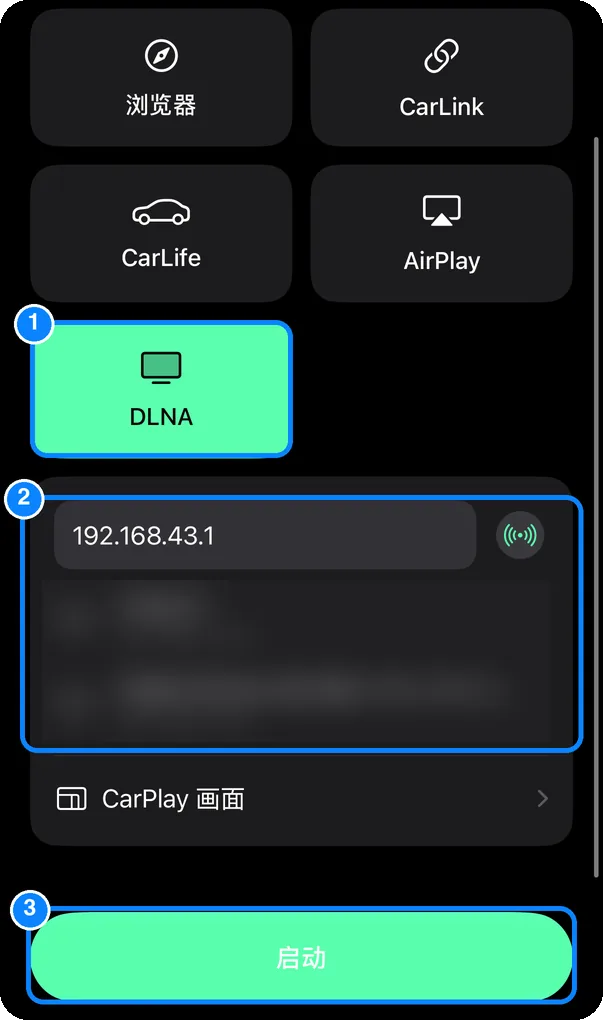
On the app’s home screen, choose DLNA, select your head unit in the list, then tap Start. If it isn’t found nearby, enter the head unit’s IP address above the list. Then watch the ring on the home screen:
- % Percentage counting up: CarPlay is starting; wait for it to finish.
- Icon pulsing: CarPlay has started and is waiting for the head unit to connect. Go to the head unit now.
- Checkmark: the head unit is connected.
- Exclamation mark: the head unit didn’t connect; the app keeps retrying.
Casting the iPhone’s screen
To show the iPhone’s own screen on the head unit instead of CarPlay, turn on iPhone screen casting in Settings. On iPhones below iOS 18, the app can only cast the iPhone’s screen.